


The year 2017 was the year of hard forks for Bitcoin. When the Blocksize War culminated in August 2017 with the Bitcoin Cash Hard Fork, this triggered a wave of Bitcoin Hard Forks. Over 20 different spin-offs from Bitcoin took place: Bitcoin Gold, Super Bitcoin, Bitcoin Platinum, Bitcoin Cash Plus, Bitcoin Uranium, Bitcoin Silver and Bitcoin God to name a few.
However, the majority of hard forks turned out to be scams whose developers wanted to profit from the name “Bitcoin” and make fast money. Accordingly, very few of you have survived. One of these survivors is Bitcoin Diamond (BCD).
What is Bitcoin Diamond?
Bitcoin Diamond (BCD) is a hard fork from Bitcoin (BTC) that took place at block height 495,866, on November 24, 2017. The current price of Bitcoin Diamond can be checked here. If you want to follow the prices of Bitcoin, Ethereum or 2,000 other Altcoins, take a closer look at our course overview.
A hard fork is essentially a change in the source code of the software after no common consensus can be found on a change, resulting in two separate versions of a block chain. In the case of Bitcoin Diamond, the developers took the source code from Bitcoin (BTC) and modified it according to their requirements.
Since both blockchains shared the same transaction history up to a block height of 495,866, Bitcoin owners received a certain amount of Bitcoin Diamond for free. In contrast to Bitcoin Cash or also Bitcoin Gold, the distribution ratio was not 1:1. Instead, Bitcoin owners received 10 Bitcoin Diamond (1 BTC : 10 BCD) for one Bitcoin. This can be explained by the increased total amount of BCD, as we will see shortly.
What is the target of Bitcoin Diamond (BCD)?
Bitcoin Diamond was announced during 2017 by two Bitcoin miners called “Team Evey” and “Team 007”. Not only little to nothing is known about both founder (teams). It is assumed that both miners originate from the Hong Kong / Singapore region. Furthermore, it is only known about both that they were frustrated by the ASIC dominance and the utilization of the Bitcoin network and therefore wanted to develop an improved Bitcoin protocol.
The main improvements that Team Evey and Team 007 wanted to make to the Bitcoin protocol were as follows:
- a lower entry threshold for new users (since Bitcoin has become very expensive and not affordable for everyone).
- faster transactions
- lower transaction fees
- better privacy and data protection: encryption of account holdings and transactions themselves
Bitcoin (BTC) vs. Bitcoin Diamond (BCD)
But which of these changes could the Bitcoin Diamond project actually implement and how did the technical implementation take place? It is worth comparing Bitcoin (BTC) with Bitcoin Diamond (BCD).
| Bitcoin Diamond (BCD) | Bitcoin (BTC) | |
| Total offer | 210 million | 21 million |
| Mining Algorithm | X13 (GPU) | SHA256 (ASIC) |
| Block time | 10 minutes | 10 minutes |
| Block size | 8 MB | 1 MB |
| SegWit | Ja | Ja |
| Difficulty Adjustment | every 2 weeks | every 2 weeks |
| Lightning Network (planned) | Yes | Yes |
Probably the most obvious difference is the total amount of BTC vs. BCD, which can be maximum. While Satoshi Nakamoto has set the maximum supply at 21 million, Bitcoin Diamond’s team believes that this amount is too small to be accessible to everyone. Bitcoin Diamond has therefore increased the total quantity to 210 million, which means that the price of BCD will be significantly lower than that of the original. Thus, the team has achieved a goal of creating the lower entry threshold for new users.
Directly after the hard fork, Bitcoin Diamond recorded its all-time high of over 91 US dollars. Already one week later a Bitcoin Diamond was worth only 50 USD. Probably also due to the bear market in 2018, the BTD rate fell to below USD 2 in October 2018. Nevertheless, BCD is still in the top 40 by market capital (as of October 2018).
The next big difference is the mining algorithm. While Bitcoin uses SHA-256 and favors ASIC-Miner in the network, Bitcoin Diamond has implemented the X13 algorithm to exclude ASICs from the BCD network. Instead, the algorithm is optimized for common graphics processors (GPU’s) in order to make mining accessible to everyone again and thus decentralize it.
In addition, Bitcoin Diamond has a larger block size. As the Bitcoin Cash Hard Forks have shown, the Bitcoin developer community hairs on the block size of 1 MB originally defined by Satoshi. The team behind BCD has increased the block size to 8 MB while leaving the block time identical. This means that Bitcoin Diamond can include 8 times more transactions in a block than Bitcoin. In combination with the capitalisation of SegWit, this results in lower transaction costs and faster transaction times.
It is also interesting to mention that Bitcoin Diamond, like Bitcoin, wants to activate the Lightning Network.
Criticism of Bitcoin Diamond
While Bitcoin Diamond has propagated four goals, it has only been able to implement three of them so far. The fourth objective, increasing data protection and privacy has been postponed indefinitely. Actually, the Bitcoin Diamond team wanted to encrypt both the account balances on the blockchain and the transaction information, such as sender, recipient and transaction amount (in a previously unknown way).
As the team mentioned in a medium post about the Lightning network, however, the team decided not to implement the data protection functions. According to the Post, the background is that the governments in Japan and Russia could soon pass laws to prevent crypto currencies from anonymizing user data. According to the developers of Bitcoin Diamond, other governments could follow suit.
This decision was met with harsh criticism from the crypto community as it was one of the main features for many that could have distinguished Bitcoin Diamond from Bitcoin Gold or Bitcoin Cash.
Bottom line: Is Bitcoin Diamond worth an investment?
The team has launched a “BCD Pay” initiative to promote the use of Bitcoin Diamond in everyday life. Looking at the partnerships that Bitcoin Diamond has been able to achieve so far, these are rather unknown names.
In our opinion, the lack of data protection functions raises doubts about the actual added value of Bitcoin Diamond over Bitcoin or Bitcoin Cash. Although BCD has fast transaction times and low transaction fees, Bitcoin Cash (BCH) can do the same. In addition, BCH has a much larger community of supporters. Compared to Bitcoin, the advantages mentioned above still exist. If the Lightning network is activated in 2019, these benefits will be taken care of.
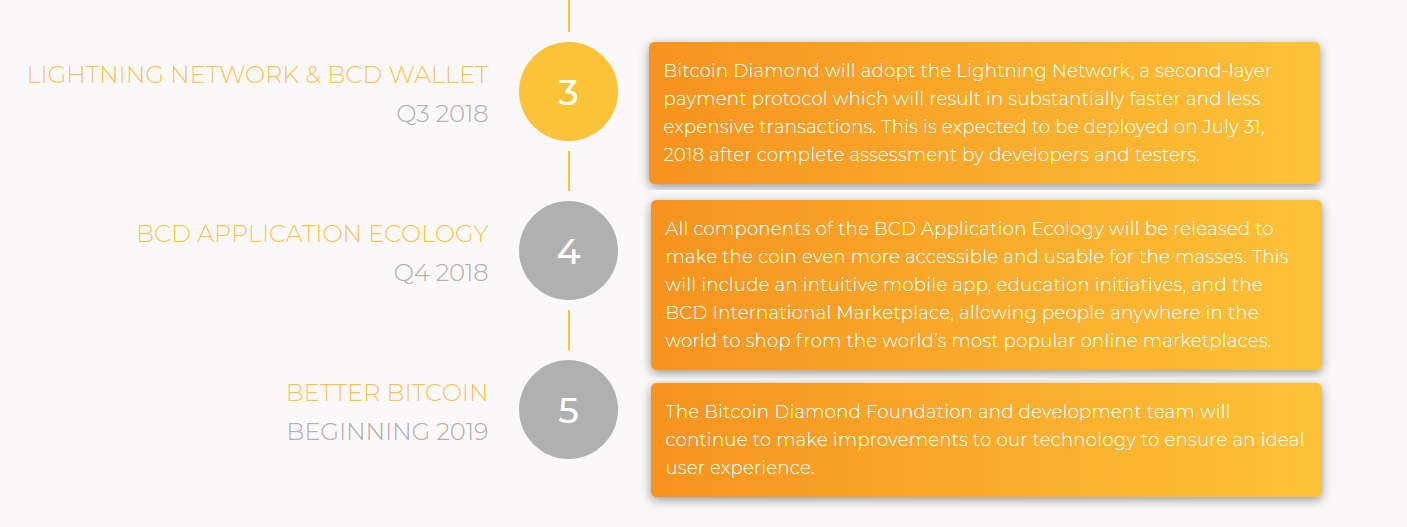
In our view, the very vague roadmap should also be criticized. The implementation of the Lightning Network should already take place by 31 July 2018. At the time of writing (October 2018), however, there were no signs of implementation in Mainnet.
You can watch the official explanation video of Bitcoin Diamond below:
Last updated: 05/07/2019
[ratings]Recommended for you:
- Buy Bitcoin Guide
- Bitcoin Wallet Tutorial
- Check 24-hour Bitcoin Price
- More Bitcoin News
- What is Bitcoin?
Subscribe to our daily newsletter!
No spam, no lies, only insights. You can unsubscribe at any time.


